Sources#
In prose, objects detected in astronomical images are represented by Source objects. To encompass the large variety of sources encountered in astronomical images, prose fatures three kinds of sources:
PointSource: starExtendedSource: comet, galaxy or lensed sourceTraceSource: diffracted spectrum, satellite streak or cosmic ray
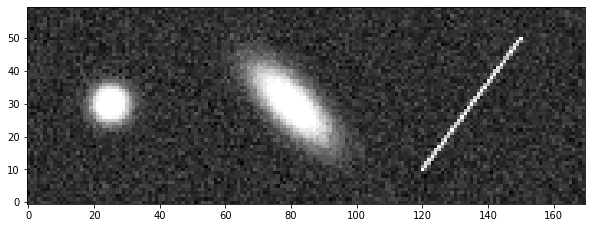
To demonstrate how to use these objects, we will work on the following example image:
[1]:
from prose.tutorials import source_example

im = source_example()
_ = im.show()
Detection#
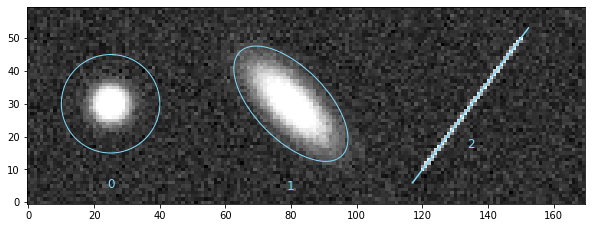
To detect these sources, detection blocks from the prose.blocks.detection module can be used:
[2]:
from prose import example_image, blocks

im = blocks.detection.AutoSourceDetection()(im)
im.show()
[2]:
<AxesSubplot:>
Note
Source-specific detection blocks are also available, like the PointSourceDetection, as well as blocks with legacy detection algorithms such as DAOFindStars
From here, sources are located in the Image.sources list
[3]:
im.sources
[3]:
array([<prose.core.source.PointSource object at 0x2b0f7d370>,
       <prose.core.source.ExtendedSource object at 0x2b0e23250>,
       <prose.core.source.TraceSource object at 0x1093d26a0>],
      dtype=object)
where we can identify the three types of sources, like an extended source at index 1
[4]:
print(im.sources[1])
⬭ ExtendedSource 1
  ----------------
  coords   79.96   29.99
  a, b     38.35   15.86
  e         0.41
  region    True
Sources properties#
Such sources contain useful properties and methods used throughout prose to perform image processing.
Apertures#
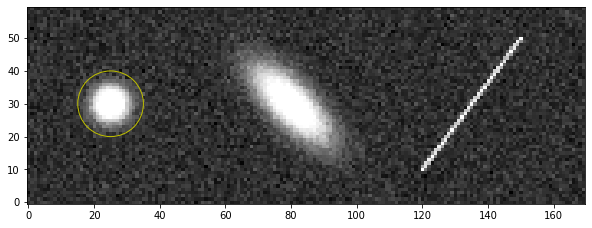
Apertures from the photutils.aperture module can easily be instantiated from a Source object
[5]:
import matplotlib.pyplot as plt

source = im.sources[0]
aperture = source.circular_aperture(10, scale=False)

# plotted on top of the image
im.show(stars=False)
_ = aperture.plot(color="y")
For automatic treatments, the Source.aperture method provides an aperture specific to each type of source
[6]:
im.show(stars=False)

for source in im.sources:
    aperture = source.aperture()
    _ = aperture.plot(color="y")
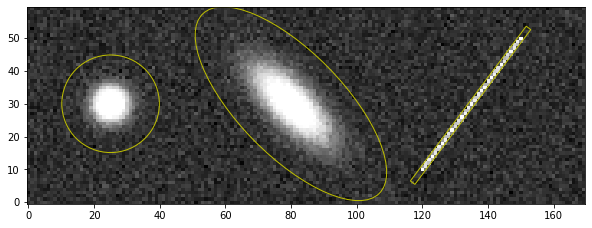
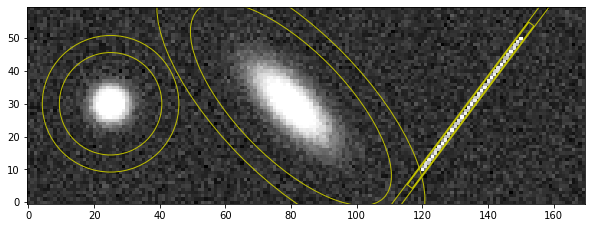
and associated annulus methods
[7]:
im.show(stars=False)

for source in im.sources:
    aperture = source.annulus()
    _ = aperture.plot(color="y")