Reports#
To communicate results, one might need to produce pdf reports out of observations. prose features auto-generated \(\LaTeX\) reports from Observation objects.
Loading the phot#
Let’s firts load some data you might have used or generated in previous tutorials (in my case I take the .phot we produced here)
[1]:
from prose import Observation
import matplotlib.pyplot as plt

obs = Observation("static/example.phot")
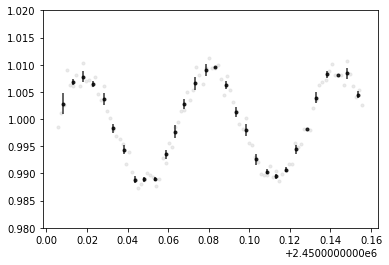
obs.plot()
_ = plt.ylim(0.98, 1.02)
Basic Summary report#
You can produce many reports in prose and arange them into the Report object so that they are all contained in a single \(\LaTeX\)/PDF. We will make a report out of the very basic Summary template, which namely shows a summary of the observation:
[2]:
from prose.reports import Report, Summary

# The summary template
summary = Summary(obs)

# The report
report = Report([summary])
report.make(f"{obs.label}_report")
making summary ...
Note
obs.label is just a conveniant attribute returning a string like "telescope_target_date_filter"
The last command generated a folder containing everything needed for the included report.tex to be compiled on your side. This is a \(\LaTeX\) file so feel free to add notes and extend it for your needs.
Compiling#
Alternatively, if you have pdflatex installed you can run report.compile()
[3]:
# only prose>=2.2.1
report.compile(destination="static/report.pdf")
Here is the final report